
Summary
This article explains how Traversal Options control movement between duplicated part instances in GibbsCAM. When the DCD Multi-Part Type is set to Part Duplication, select either Off Part Location or Part Clearance. The Off Part Location is the event location assigned to Part Instance Change in the active MDD's Machine Manager.
Table of Contents
Before You Begin
Confirm that the duplicated parts, fixtures, and workholding are positioned correctly in the GibbsCAM part.
Identify whether the move between part instances should use the normal Part Clearance behavior or a machine-defined Off Part Location.
If you will edit the MDD, save a copy or coordinate the change with the person responsible for machine definitions and posts.
Important: Traversal Options define the transition between duplicated parts. Always simulate the complete multi-part sequence and verify clearance from fixtures, stock, and machine components.
Procedure
Step 1 - Configure Part Duplication
Open the Document Control Dialog (DCD) for the part.
Open the Multi-Part tab.
Set Multi Part Type to Part Duplication.
Set the Duplication Type, Number of Parts, and Origin Offset or defined positions as required for the setup.
Step 2 - Select the Traversal Behavior
Select Off Part Location when each part-instance change must pass through the event location assigned to Part Instance Change in the active MDD.
Select Part Clearance when the between-part transition should use the job's normal part-clearance behavior rather than adding an MDD event location for the part change.
Save or close the DCD after confirming the remaining Multi-Part sequencing options for the job.
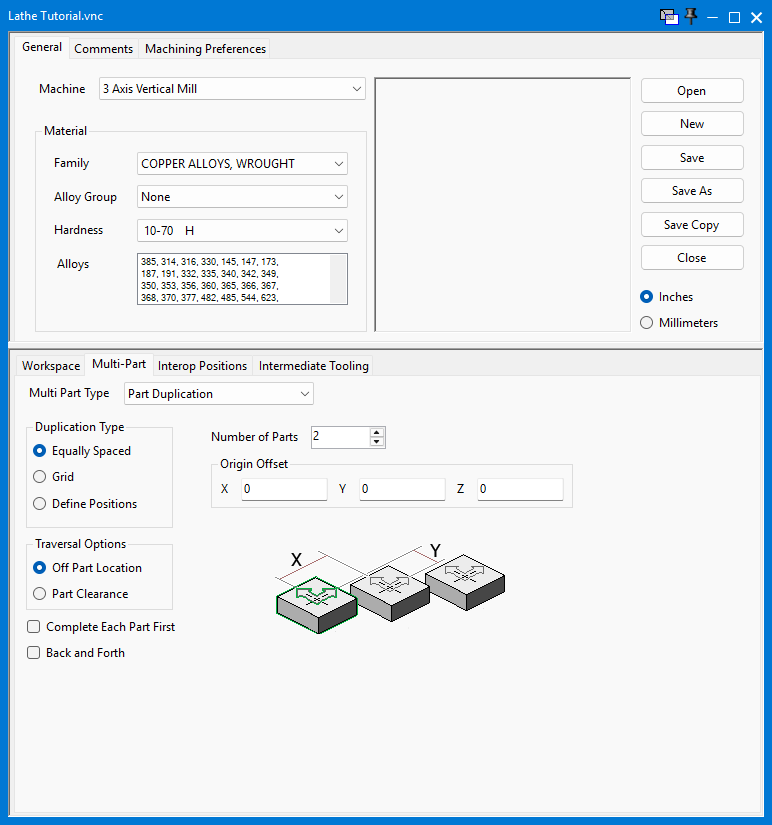
Figure 1 - DCD Multi-Part settings with Part Duplication and Traversal Options.
Step 3 - Define the Off Part Location in the MDD
Complete this step only when Off Part Location is selected in the DCD.
Open Machine Manager for the MDD used by the active machine configuration.
Select the required Flow Axis Set, then open the Interop Events tab.
In Current Events, select Part Instance Change. If it is not present, select it under Available Events and add it to Current Events.
Select Change Loc to assign the event location used for the part-instance change.
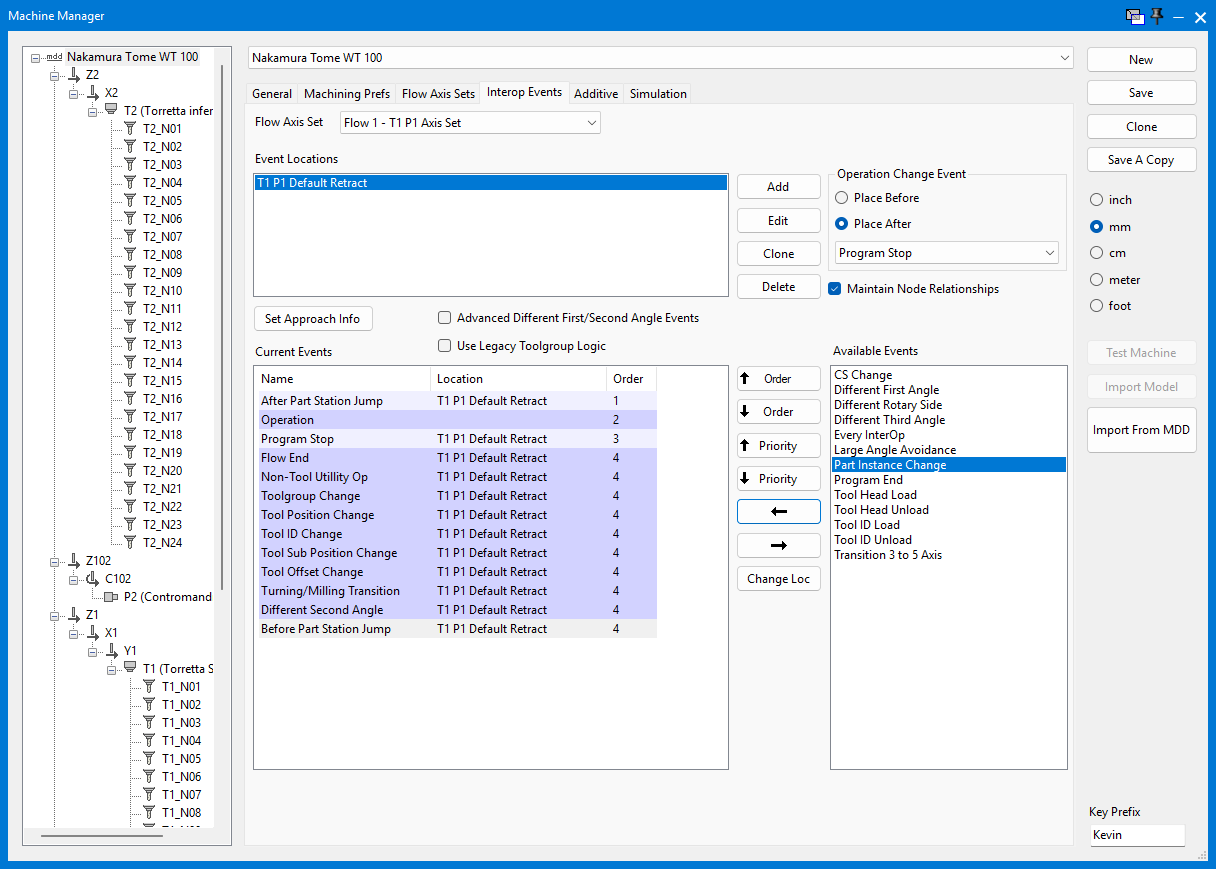
Figure 2 - Select Part Instance Change in Available Events before adding it to Current Events.
In the Choose Event Location dialog, select the required location and choose OK.
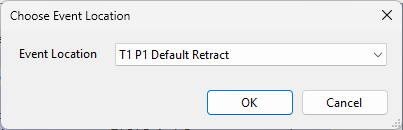
Figure 3 - Choose Event Location for Part Instance Change.
Save the MDD. Reload or reactivate the machine configuration if required by the local workflow.
Step 4 - Regenerate and Verify
Return to the GibbsCAM part and confirm the intended Traversal Option in the DCD.
Recalculate the affected operations.
Simulate the complete multi-part operation sequence with the tool, holder, stock, fixtures, and machine components included in collision checking.
Inspect every transition between part instances. Off Part Location should use the location assigned to Part Instance Change; Part Clearance should use the configured part-clearance behavior.
If a transition is not safe, correct the selected traversal option, part-clearance settings, or MDD event location, then regenerate and simulate again.
Review the posted program and follow the shop's normal prove-out procedure before machining the parts.
Expected Result
Moves between duplicated part instances follow the selected Traversal Option. Off Part Location routes the part-instance change through the event location assigned in the active MDD, while Part Clearance uses the configured part-clearance behavior. The complete multi-part sequence has been regenerated and verified in simulation.
Troubleshooting
Problem: Traversal Options are not available in the DCD.
Possible Causes
The Multi Part Type is not set to Part Duplication.
The active setup or machine configuration does not support the required Multi-Part workflow.
Resolution
Open the DCD Multi-Part tab, set Multi Part Type to Part Duplication, and confirm that the active machine configuration supports the intended setup.
Problem: Off Part Location is selected, but the transition does not use the expected position.
Possible Causes
Part Instance Change is missing from Current Events for the active Flow Axis Set.
Part Instance Change is assigned to the wrong event location, or a different MDD or Flow Axis Set is active.
The MDD change was not saved or the machine configuration was not refreshed.
Resolution
Open the active MDD in Machine Manager, verify Part Instance Change under Interop Events for the correct Flow Axis Set, assign the intended event location, save the MDD, and regenerate the operations.
Problem: The between-part move crosses stock or workholding.
Possible Causes
The selected Part Clearance behavior does not provide enough clearance for the setup.
The assigned Off Part Location is not clear of all fixtures or machine components.
The operations were not regenerated after the traversal setting changed.
Resolution
Choose a safe traversal method, increase the applicable part clearance or assign a safe Off Part Location, regenerate the affected operations, and simulate the full sequence again.
Related Articles
Explore More from CAMCO
Visit the CAMCO website to learn more about:
Keywords
Traversal Options, Part Duplication, Multi-Part, Off Part Location, Part Clearance, Part Instance Change, Interop Events, Event Location, Machine Manager, MDD