
Summary
A String File Error may occur when opening a SolidWorks file in GibbsCAM. The issue is associated with the SolidWorks PDM interface rather than GibbsCAM itself. A missing SolidWorks PDM DLL can be transferred through the SolidWorks interface and cause the error to appear when GibbsCAM starts or when a SolidWorks file is used.
Error Message
Displayed message: Error reading string file 'SETTINGS.DLG': The file couldn't be opened (missing?) Row=-1, String=-1
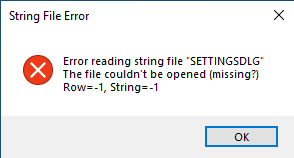
Figure 1 - String File Error reporting that SETTINGS.DLG could not be opened.
Cause
The error is caused by a missing DLL associated with SolidWorks PDM. The DLL is specific to SolidWorks and its PDM functionality. The SolidWorks interface transfers this component into GibbsCAM, which can make the error appear when GibbsCAM starts.
Important: This is a SolidWorks PDM issue, not a GibbsCAM issue. Correct the SolidWorks/PDM installation before changing or reinstalling GibbsCAM.
Resolution
Because the missing component belongs to SolidWorks PDM, resolve the issue within the SolidWorks/PDM installation.
Confirm that the affected computer uses SolidWorks and/or SolidWorks PDM.
Record the exact String File Error message and identify the missing SolidWorks PDM DLL associated with it.
Repair or otherwise correct the affected SolidWorks PDM installation so the required component is available.
Relaunch GibbsCAM and verify that the String File Error no longer occurs.
Note: If assistance is required identifying or restoring the missing SolidWorks PDM component, contact the SolidWorks/PDM administrator or SolidWorks support.
Expected Result
GibbsCAM launches without displaying the String File Error, and the SolidWorks interface operates normally.
Additional Information
The original issue was traced to the SolidWorks PDM interface and a missing DLL specific to SolidWorks/PDM.
The SolidWorks interface can transfer the affected component into GibbsCAM, so the message may appear to originate in GibbsCAM even though the underlying fault is external.
Avoid replacing DLL files manually unless directed by a qualified SolidWorks/PDM administrator or SolidWorks support. A repair of the installed product preserves version and dependency matching.
Best Practices
Keep SolidWorks and SolidWorks PDM installations properly maintained and on compatible versions.
When this error occurs, investigate the SolidWorks/PDM installation before troubleshooting the GibbsCAM installation.
Capture the complete error message before dismissing it so the missing component can be identified accurately.
Contact the appropriate SolidWorks/PDM administrator when a SolidWorks PDM component is missing.
Troubleshooting
Problem: The installer launches after selecting OK on the String File Error but remains on an hourglass.
Possible Causes
The underlying SolidWorks PDM DLL is still missing or unavailable.
The repair process cannot complete because the affected SolidWorks/PDM component has not been restored.
Resolution
Address the missing component through the SolidWorks/PDM installation rather than reinstalling or modifying GibbsCAM. If the installer remains unresponsive, stop the repair and contact the SolidWorks/PDM administrator or SolidWorks support with the exact error message.
Problem: The String File Error returns after GibbsCAM is restarted.
Possible Causes
The SolidWorks/PDM repair did not restore the required DLL.
The restored component does not match the installed SolidWorks/PDM version.
Resolution
Verify the SolidWorks and PDM versions on the computer, then run the appropriate SolidWorks/PDM repair again. Do not copy an unverified DLL from another workstation. Escalate the issue to the SolidWorks/PDM administrator or SolidWorks support if the component remains unavailable.
Related Articles
- SolidWorks File Not Opening
- Error: "swdocumentmgr.dll"
- How to Import CAD Files and CAD Compatibilities
- PMI Data
- Trouble Importing Solid Edge Files
Explore More from CAMCO
Visit the CAMCO website to learn more about:
Keywords
String File Error, SolidWorks, SolidWorks PDM, PDM Error, SolidWorks DLL, Missing DLL, SETTINGS.DLG, SolidWorks Interface, GibbsCAM SolidWorks, CAD Interoperability