
Summary
This article explains how to download the latest supported version of GibbsCAM, along with the associated documentation, installation guides, hardware key drivers, and network licensing software.
Whether you are installing GibbsCAM for the first time, upgrading to a newer release, or reinstalling the software on an existing computer, this article will guide you to the appropriate download resources.
Table of Contents
Before You Begin
Before downloading GibbsCAM:
Verify your maintenance subscription is current.
Confirm your Windows version is supported.
Ensure you have Administrator privileges for installation.
Determine whether you use:
Hardware Key
Network License (NLO)
Procedure
Step 1 – Open the GibbsCAM Online Services Website
Open the official GibbsCAM Online Services website:
No login is required.
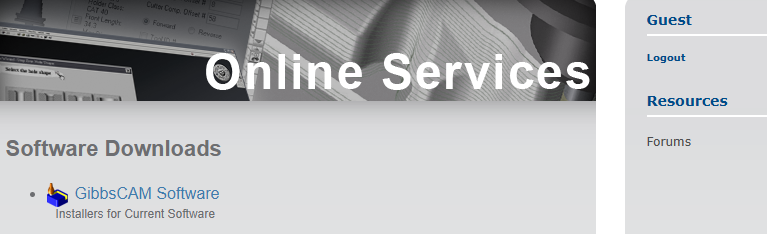
Step 2 – Navigate to and Download GibbsCAM
Under Software Downloads, click the GibbsCAM Software.
Locate the version you wish to install.
Select the language using the dropdown menu.
Click Download Now.
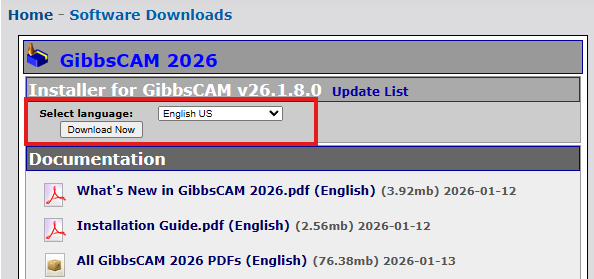
Note
Previous supported versions of GibbsCAM may also be available from the Online Services portal. Install the version appropriate for your maintenance agreement or as directed by CAMCO Support.
Step 3 – Documentation Download
Available documentation typically includes:
Installation Guide
What's New Guide
Complete PDF Documentation Set
Step 4 – Download Additional Components (If Required)
Depending on your licensing configuration, additional downloads may be required.
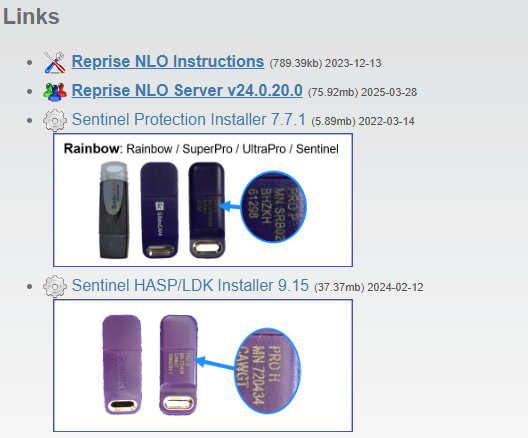
Standalone Hardware Key Licenses
For first-time installations, or if instructed by CAMCO Support, download:
Sentinel Protection Installer
Sentinel HASP/LDK Driver
Network License (NLO)
Network License users may also need:
Reprise NLO Server
Reprise NLO Instructions
These files are available from the Online Services portal under Links.
Step 5 – Review the Installation Guide
Before installing GibbsCAM:
Review the Installation Guide.
Verify system requirements.
Confirm your licensing method.
Close all running instances of GibbsCAM.
Following the Installation Guide helps prevent common installation issues.
Related Video
Best Practices
Download GibbsCAM only from official GibbsCAM download resources.
Install the latest supported release whenever possible.
Keep a copy of the installer for future repairs or reinstallations.
Review the "What's New" document before upgrading production systems.
Back up custom posts, machine definitions, and user preferences before upgrading.
Common Questions
Can I install over an existing version?
Yes. Each version is a standalone install and can be installed without removing the previous version, but always review the installation guide for version-specific recommendations.
Do I need to download new hardware key drivers?
Generally no, if you already have the hardware key drivers installed you will not need to install new drivers. Install updated Sentinel drivers only if recommended by CAMCO Support or if you experience hardware key detection issues.
Which Network License Server should I download?
For the system acting as your server, use the Reprise RLM server for GibbsCAM 2024 and newer. Earlier GibbsCAM releases may require the legacy CimLM server. Verify your version before downloading.
Troubleshooting
Problem: Download Does Not Start
Possible causes
Browser security settings
Corporate firewall
Internet connectivity
Resolution
Try another browser or temporarily disable download blocking policies.
Problem: Download Appears Corrupted
Resolution
Delete the installer and download it again.
Problem: Cannot Access Online Services
Resolution
Verify Internet connectivity.
If the site remains unavailable, contact CAMCO Support.
Related Articles
Installing Hardware Key Drivers
Offline Registration Guide (Hardware-Locked Licenses)
Online Registration Guide (Hardware-Locked Licenses)
How to Migrate GibbsCAM Settings from a Previous Installation
Hardware and System Requirements
Keywords
Download GibbsCAM, Latest GibbsCAM Version, GibbsCAM Installer, Install GibbsCAM, Upgrade GibbsCAM, Reinstall GibbsCAM, GibbsCAM Downloads, Sentinel Driver, Hardware Key Driver, Network License Server, Reprise RLM, Installation Guide, What's New, System Requirements, Online Services, Software Download, Download Installer, Download Latest Release, GibbsCAM Update.