
Summary
The GibbsCAM Network License (NLO) Server uses Reprise License Manager (RLM) to manage floating licenses. In some cases, users may appear inactive or disconnected while still holding a license, preventing others from accessing it.
This article explains how to identify and remove inactive license sessions using the RLM Web Administration interface and administrative controls.
Table of Contents
Overview
RLM does not actively “kill” user sessions in most normal workflows. Instead, it relies on:
Client disconnect detection
License timeouts (if configured)
Manual administrative intervention
Administrators can release licenses held by inactive or disconnected users through the RLM Web Administration interface.
Before You Begin
Before attempting to remove a user session:
Confirm the user is truly inactive (not just temporarily idle)
Verify that the workstation is not actively running GibbsCAM
Ensure you have administrative access to the license server
Inform the user if possible to avoid data loss or disruption
Procedure
Depending on your RLM configuration and version, you may have one of the following options:
Option A: Reclaim via Server Status Page
Navigate to the RLM administration page:
http://localhost:5054
If accessing remotely, replace localhost with the server hostname or IP address.
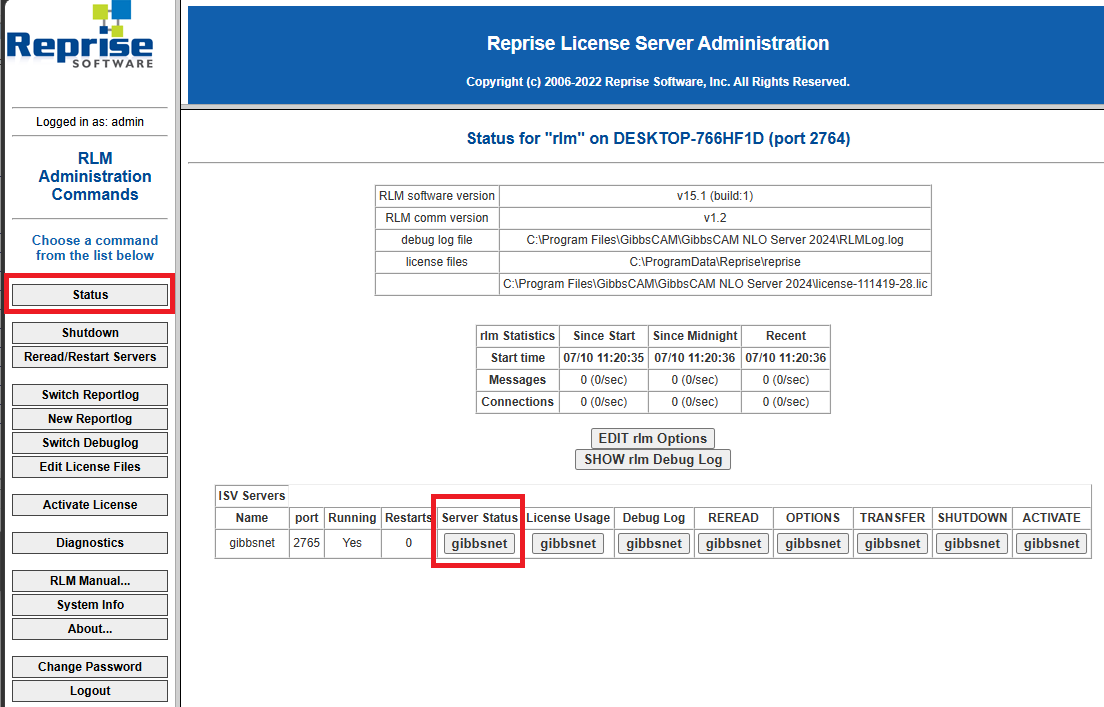
Click the Status button on the left menu.
Under Server status click the Gibbsnet button.
Locate the License Pool Status chart.
This chart will display:
Name of the licensed option
Count of how many total seats of each option
How many seats are currently In Use
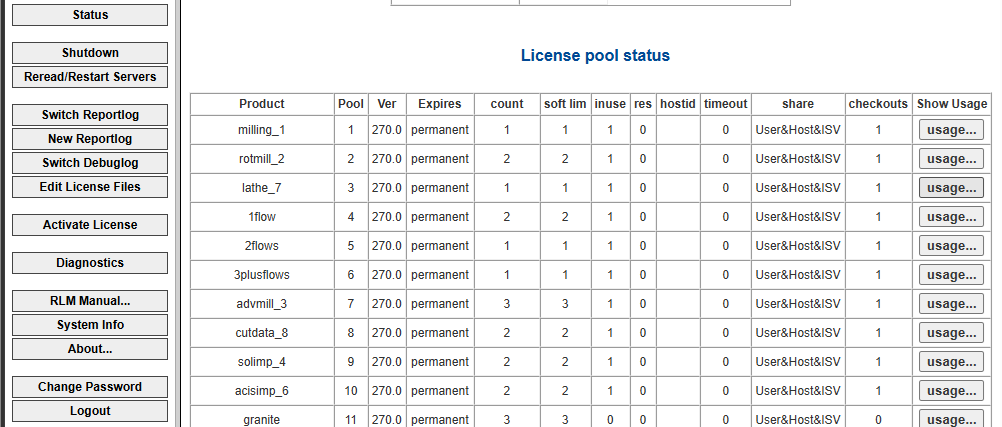
Click the Usage button to the right.
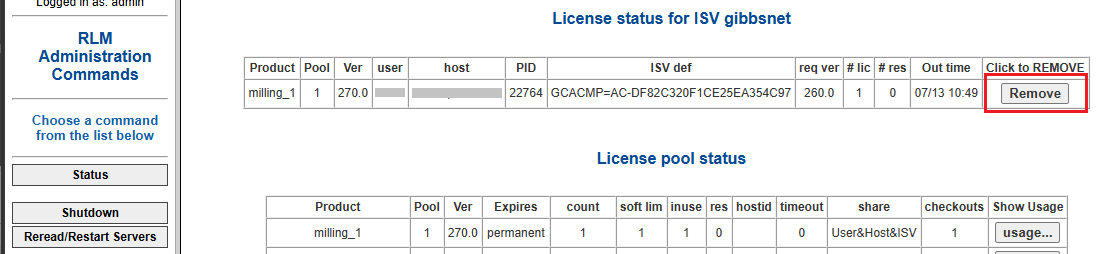
Locate the user.
Click Remove to kick the user and remove their license.
Note: The user may lose any unsaved work.
Option B: Restart the ISV Server (Less Targeted)
If individual session removal is not available:
Restart the GibbsRLMServer service.
This will terminate all active sessions.
Users will need to restart GibbsCAM and reconnect.
⚠️ This method impacts all users and should only be used during maintenance windows.
Option C: Timeout-Based Recovery (Recommended for Long-Term Control)
Instead of manually kicking users, configure license timeout rules using the RLM options file:
TIMEOUT gibbscam 3600
This automatically releases licenses after 1 hour of inactivity.
Verify License Release
After removing or timing out a session:
Refresh the RLM Web Interface.
Confirm the license count has increased.
Ask another user to verify license availability in GibbsCAM.
Expected Result
Inactive or disconnected users no longer occupy GibbsCAM licenses, making them available to active users.
Important Considerations
Forcing a license release may cause loss of unsaved work.
Some sessions may appear active due to background network activity.
Roaming licenses cannot be forcibly reclaimed unless the client reconnects.
Not all RLM configurations allow direct session termination.
Best Practices
Use TIMEOUT rules instead of manual intervention whenever possible.
Monitor usage regularly to identify inactive sessions early.
Communicate with users before terminating licenses.
Avoid restarting the server unless absolutely necessary.
Combine this process with license usage tracking for proactive management.
Troubleshooting
Problem: No Option to Remove User Session
Cause
Your RLM version or configuration does not support manual session termination.
Resolution
Use TIMEOUT rules or restart the ISV server during maintenance windows.
Problem: User Reappears Immediately After Being Removed
Cause
The workstation is still running GibbsCAM and reconnecting automatically.
Resolution
Have the user close GibbsCAM completely before attempting removal again.
Problem: License Count Does Not Update After Removal
Possible Causes
UI not refreshed
ISV server delay
Multiple license features involved
Resolution
Refresh the RLM web page and verify all ISV features.
Related Articles
- How to Track NLO Usage
- How to Configure User Groups in RLM
- How to Reserve GibbsCAM Licenses for Specific Users
- RLM Options File Reference NLO
- How to Use Roaming Licenses
- How to Change the NLO Server Ports
Keywords
RLM, License Reclaim, Kick User, Inactive User, Network License, NLO, GibbsCAM, ISV Server, License Timeout, TIMEOUT, License Release