
Summary
The Reprise License Manager (RLM) options file is used to control advanced behavior of the GibbsCAM Network License (NLO) Server. It allows administrators to define rules such as user groups, license reservations, access restrictions, and usage limits.
This article provides a reference of the most commonly used RLM options supported in GibbsCAM deployments.
Table of Contents
- Create the ISV Options File
- Basic Syntax Rules
- Common RLM Directives
- Applying Changes
- Verification
- Troubleshooting
- Best Practices
- Related Articles
Overview
The RLM options file is a plain text configuration file processed by the GibbsCAM license server.
It is typically used to:
Define user groups
Reserve licenses
Restrict license usage
Control license allocation behavior
Monitor or log license usage
Changes to the options file require a restart of the GibbsRLMServer service or a reload through the RLM Web Administration interface.
Create the ISV Options File
On the server, create a file named "gibbsnet.opt" here:
C:\Program Files\GibbsCAM\GibbsCAM NLO Server 2024
Basic Syntax Rules
One directive per line
Case-sensitive keywords
No quotation marks unless required for paths
Blank lines are allowed
Lines beginning with # are treated as comments
Example:
# Example RLM options file
GROUP Engineering jsmith mbrown tlee
RESERVE 3 gibbscam GROUP Engineering
Common RLM Directives
GROUP
Defines a group of users.
Syntax:
GROUP group_name user1 user2 user3
Example:
GROUP Engineering jsmith mbrown tlee
RESERVE
Reserves licenses for a user, group, or host.
Syntax:
RESERVE number feature USER|GROUP|HOST name
Example:
RESERVE 2 gibbscam USER jsmith
RESERVE 3 gibbscam GROUP Engineering
INCLUDE
Allows only specified users or groups to use a feature.
Syntax:
INCLUDE feature USER|GROUP name
Example:
INCLUDE gibbscam GROUP Engineering
EXCLUDE
Prevents specified users or groups from using a feature.
Syntax:
EXCLUDE feature USER|GROUP name
Example:
EXCLUDE gibbscam USER trainee01
HOST
Restricts license usage to specific computers.
Syntax:
HOST hostname
Used in combination with other directives such as RESERVE or INCLUDE.
HOST_GROUP
Defines a group of computers.
Syntax:
HOST_GROUP group_name host1 host2
Example:
HOST_GROUP CADStations CAD01 CAD02 CAD03
MAX
Limits the number of licenses a user or group can use simultaneously.
Syntax:
MAX number feature USER|GROUP name
Example:
MAX 2 gibbscam USER jsmith
TIMEOUT
Reclaims inactive licenses after a specified time.
Syntax:
TIMEOUT feature seconds
Example:
TIMEOUT gibbscam 3600
This example reclaims a license after 1 hour of inactivity.
NOLOG
Disables logging for a feature.
Syntax:
NOLOG feature
Example:
NOLOG gibbscam
Applying Changes
After editing the options file:
Save the file
Restart the GibbsRLMServer service
OR
Use the RLM Web Administration interface to reload configurationVerify the license server status
Verification
To confirm changes are applied:
Open the RLM Web Interface:
http://localhost:5054
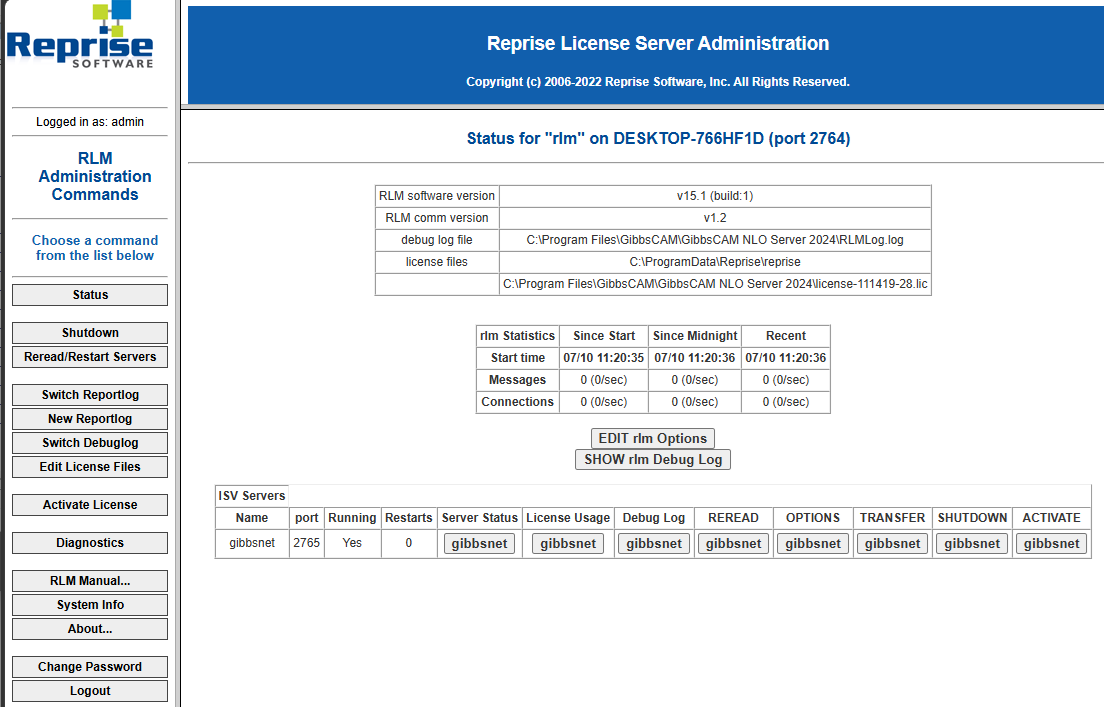
Check:
License usage
Group definitions
Reservation behavior
Error logs
Launch GibbsCAM on a client workstation and verify expected behavior
Expected Result
The GibbsCAM Network License Server applies administrative rules defined in the RLM options file, enabling controlled and predictable license usage across the organization.
Troubleshooting
Options File Not Taking Effect
Possible Causes
Syntax error in file
Service not restarted
File not in correct directory
Resolution
Check logs in the RLM web interface and correct syntax issues.
Users Ignoring Group Rules
Possible Causes
Username mismatch
Incorrect feature name
Options file not loaded
Resolution
Verify exact usernames as reported by RLM and reload server configuration.
Licenses Not Available After Adding RESERVE Rules
Cause
Too many licenses reserved
Resolution
Reduce reserved count or review group assignments
Best Practices
Always back up the options file before editing
Use groups instead of individual users when possible
Document all changes
Apply changes during maintenance windows
Validate syntax before restarting the server
Avoid excessive reservation of licenses
Related Articles
- How to Configure User Groups in RLM
- How to Reserve GibbsCAM Licenses for Specific Users
- How to Change the NLO Server Ports
- How to Track NLO Usage
- How to Use Roaming Licenses
Keywords
RLM, Options File, GROUP, RESERVE, INCLUDE, EXCLUDE, HOST, HOST_GROUP, MAX, TIMEOUT, NOLOG, License Server, Network License, NLO, GibbsRLMServer