
Summary
This article explains how to make the Add Legacy Depth Feeds option available in a GibbsCAM process dialog. The option becomes available when Transition Between Holes is set to Absolute Z or Hole Feature and Rapid In is cleared on the Bore tab.
Table of Contents
Procedure
Step 1 - Open the Process
Double-click the applicable process tile to open the process dialog.
Step 2 - Set Transition Between Holes
Locate the Transition Between Holes settings.
Select Absolute Z or Hole Feature.
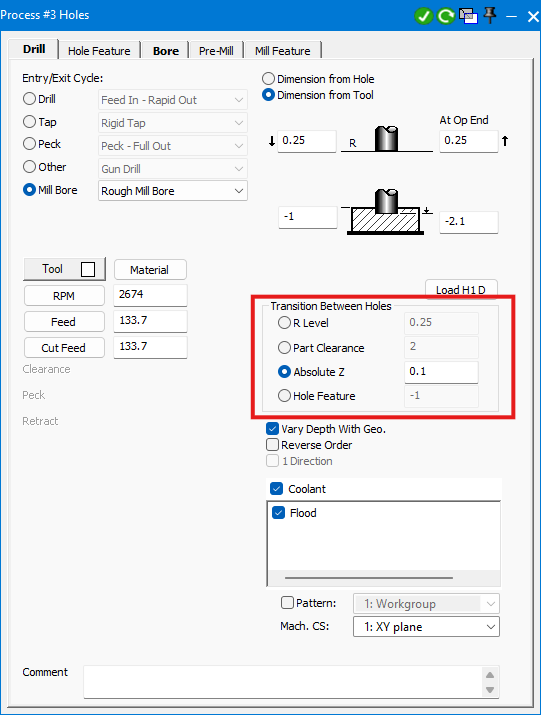
Step 3 - Disable Rapid In and Enable Legacy Depth Feeds
Select the Bore tab.
Clear the Rapid In checkbox.
Confirm that Add Legacy Depth Feeds is available, then select it if needed.
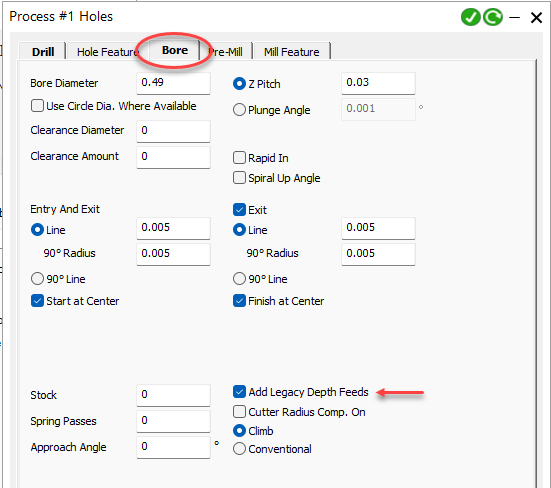
Recalculate the operation and verify the toolpath before posting the program.
Expected Result
The Add Legacy Depth Feeds option is available and can be selected for the process.
Related Articles
- How to Migrate Settings from a Previous GibbsCAM Installation
- How to Clear Out Old MDD and VMM for New Updated Versions
- Instructions - How to Get Your GibbsCAM Post Processor Modified
Explore More from CAMCO
Visit the CAMCO website to learn more about:
Keywords
Add Legacy Depth Feeds, Legacy Depth Feeds, Depth Feed, Drilling Process, Transition Between Holes, Absolute Z, Hole Feature, Bore Tab, Rapid In, GibbsCAM Drilling